How to Successfully Implement a CDP: The Complete Guide for Marketers
|
Post written by
Photo: Brooke Cagle

How do I choose a CDP?
A Customer Data Platform (CDP) has become the heartbeat of modern marketing and customer communication. It gathers, unifies, and activates customer data to let you run personalized, trigger-based, and omnichannel communication in real time.
But a CDP isn't a "silver bullet." Setting it up is complex and requires close teamwork between business, tech, and your organization. Many companies get lost because they see the CDP as a tech purchase rather than a business-driven transition.
In this article, we'll walk through what a successful CDP rollout looks like—from strategy to activation—and how to avoid the most common pitfalls.
1. Start with business value, not the tech
The biggest difference between successful and failed CDP projects is the starting point. If a project kicks off with "Which CDP should we buy?" you risk letting the technology drive you rather than your goals.
Instead, successful projects start with business needs:
What problems do we want to solve? Is the goal to reduce churn, drive upsells, boost loyalty, or improve the customer experience?
Which use cases are top priorities? Examples include welcome flows, personalized e-commerce, proactive service, or churn prevention.
How will we measure success? Define KPIs and track them from day one so you can show value early on.
By starting with the business side, you can easily guide which data sources matter most, how to set up the platform, and which processes you need to build.
2. Different types of CDPs
Not all CDPs are the same. Gartner and other analysts usually divide the market into three main categories:
Marketing Clouds (Suites) – Examples include Adobe, Salesforce, Microsoft Dynamics 365. These are broad suites where the CDP is just one component among many. They suit organizations that are already heavily invested in a large suite and want everything in one place.
Data Integrators – Examples include Segment, Tealium, Treasure Data, mParticle. These excel at collecting, structuring, and distributing data. They are great for companies with complex setups that need flexible integration.
Smart Hubs – Examples include Bloomreach, Insider, Optimove, Blueshift. These focus heavily on activating data for marketing and personalization. They combine data gathering with campaign orchestration and management.
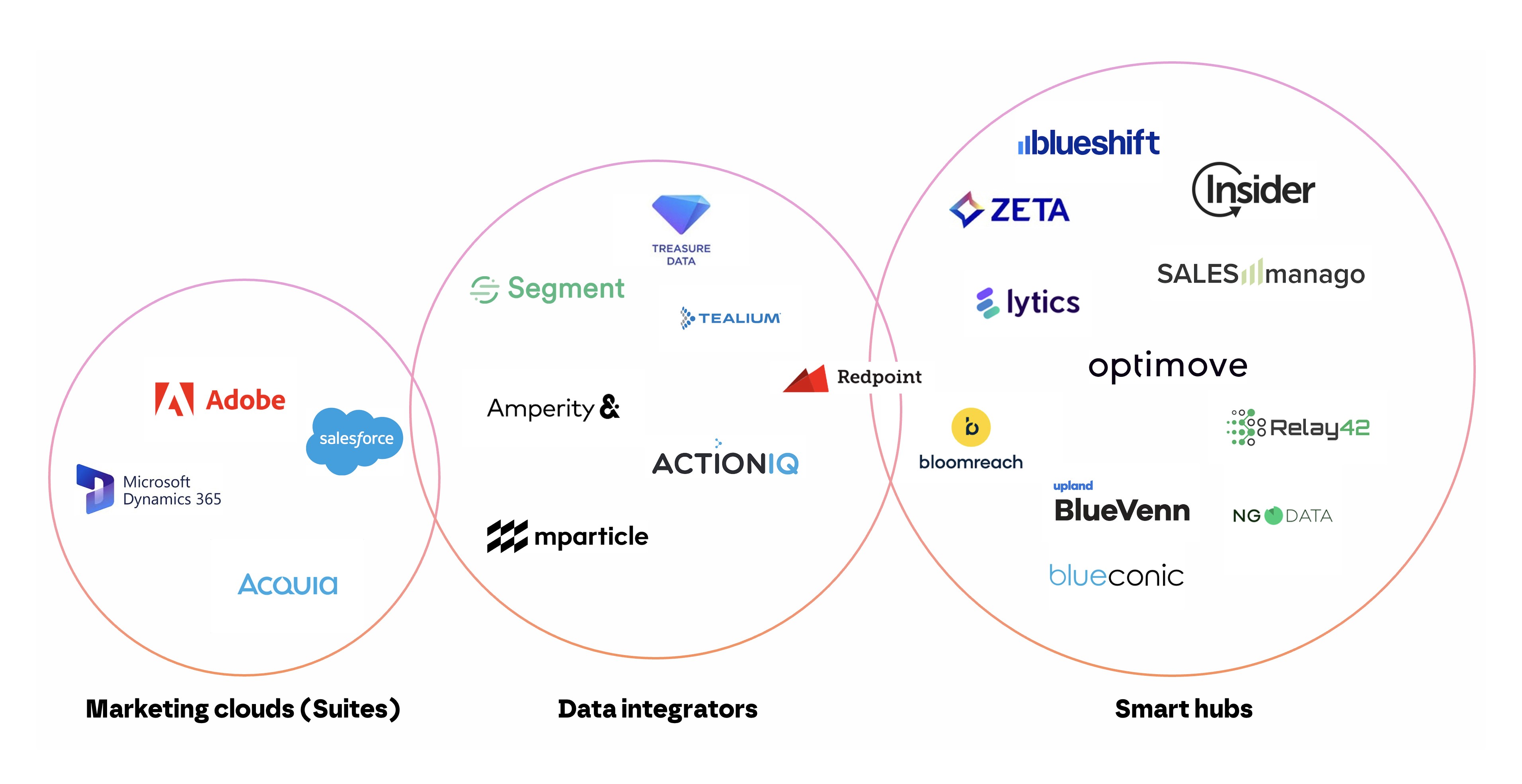
The CDP landscape.
The right CDP for you depends on both your tech setup and your business strategy. If you have a heavy IT footprint and need maximum flexibility, a data integrator might be your best bet. If you want quick time-to-value and a focus on personalization, a smart hub could be the way to go.
3. Build a unified customer profile
The core of any CDP is its ability to build a 360-degree view of your customer—a "single customer view" that brings all interactions and attributes together in one place.
In practice, this means:
Consolidating data from all sources: CRM, e-commerce, web, apps, customer service, loyalty programs, and physical stores.
Matching different IDs: The same customer might exist in your systems as a newsletter subscriber, loyalty member, app user, and web visitor. Using email, phone number, loyalty ID, cookie ID, or device ID, these identities can be merged.
Unifying profiles: A solid CDP cleans up duplicates to create a single profile for all your communications.
Without this complete picture, personalization and omnichannel marketing are just wishful thinking.
4. Secure consent and build trust
First-party data relies on customers sharing their details willingly. That’s why consent and privacy management must sit at the heart of your CDP setup.
This means:
Clear consent collection: Customers should understand what data you gather and why.
Flexibility for the user: It must be simple for customers to opt out or change their settings.
An updated privacy policy: Your policy needs to cover every scenario where the CDP is used—like combining web data with loyalty data, or using details for targeted ads.
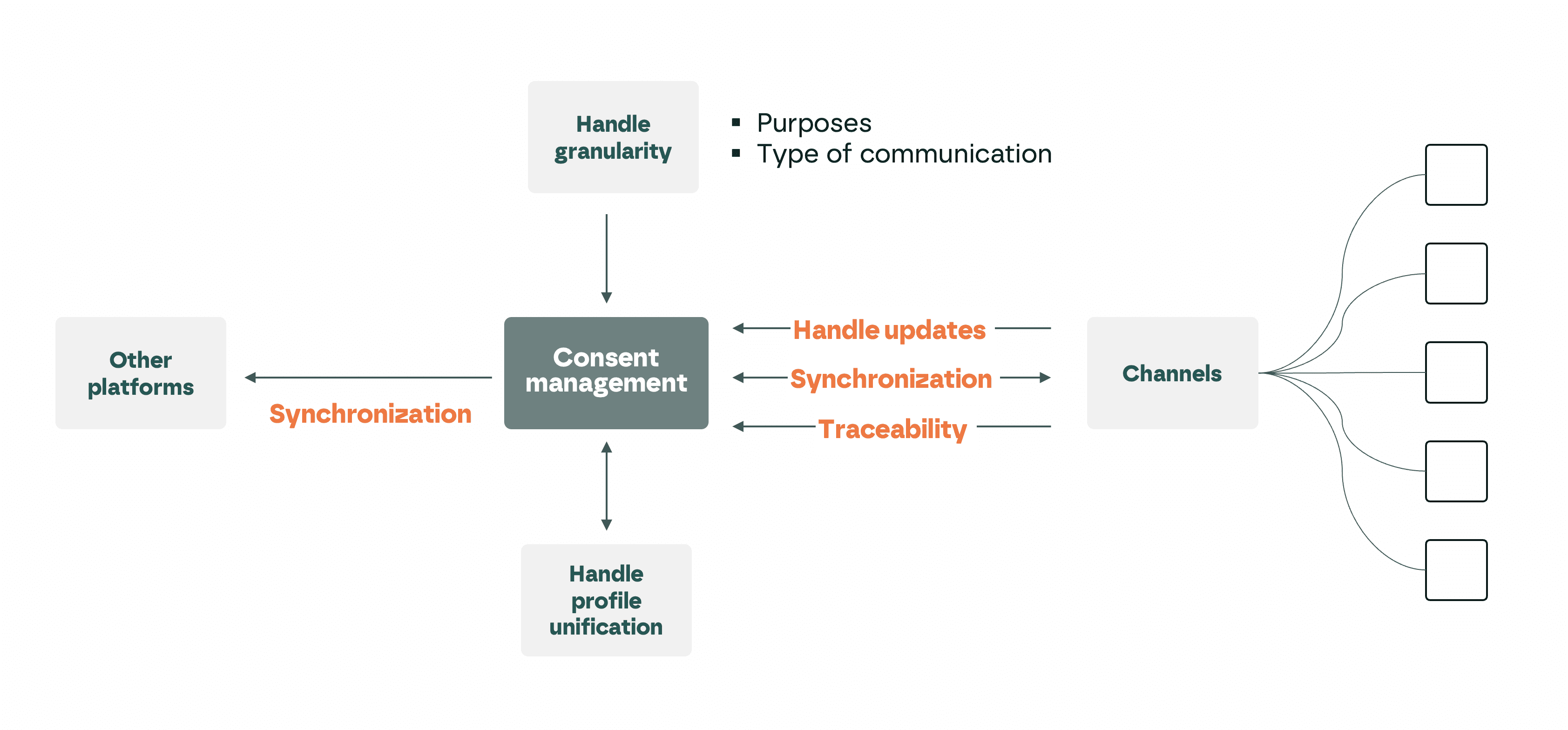
Common business requirements for consent management.
Taking privacy seriously isn't just about legal compliance. It's about trust—and trust is the foundation of any long-term customer relationship.
5. Set up a data model that fits your business
The data model is your CDP's lifeblood. It determines how easily you can use your data. There are two main types of models, and they work quite differently.
Event-based model: Here, all data is stored as "events" (like logging in, making a purchase, adding an item to a cart, or opening an email). This model is highly flexible and makes it easy to set up triggers and real-time messaging. It's perfect for industries with lots of interactions and high data volumes, like retail and e-commerce.
Relational database: This model stores data in more complex structures to map out connections between different things (like customer, booking, product, and hotel room). This model is more advanced and necessary for complex business setups, such as travel, telecom, or insurance.
The best choice simply depends on your business needs. For most companies, an event-based model is more than enough—but for highly complex setups, a relational database is key to mirroring reality.
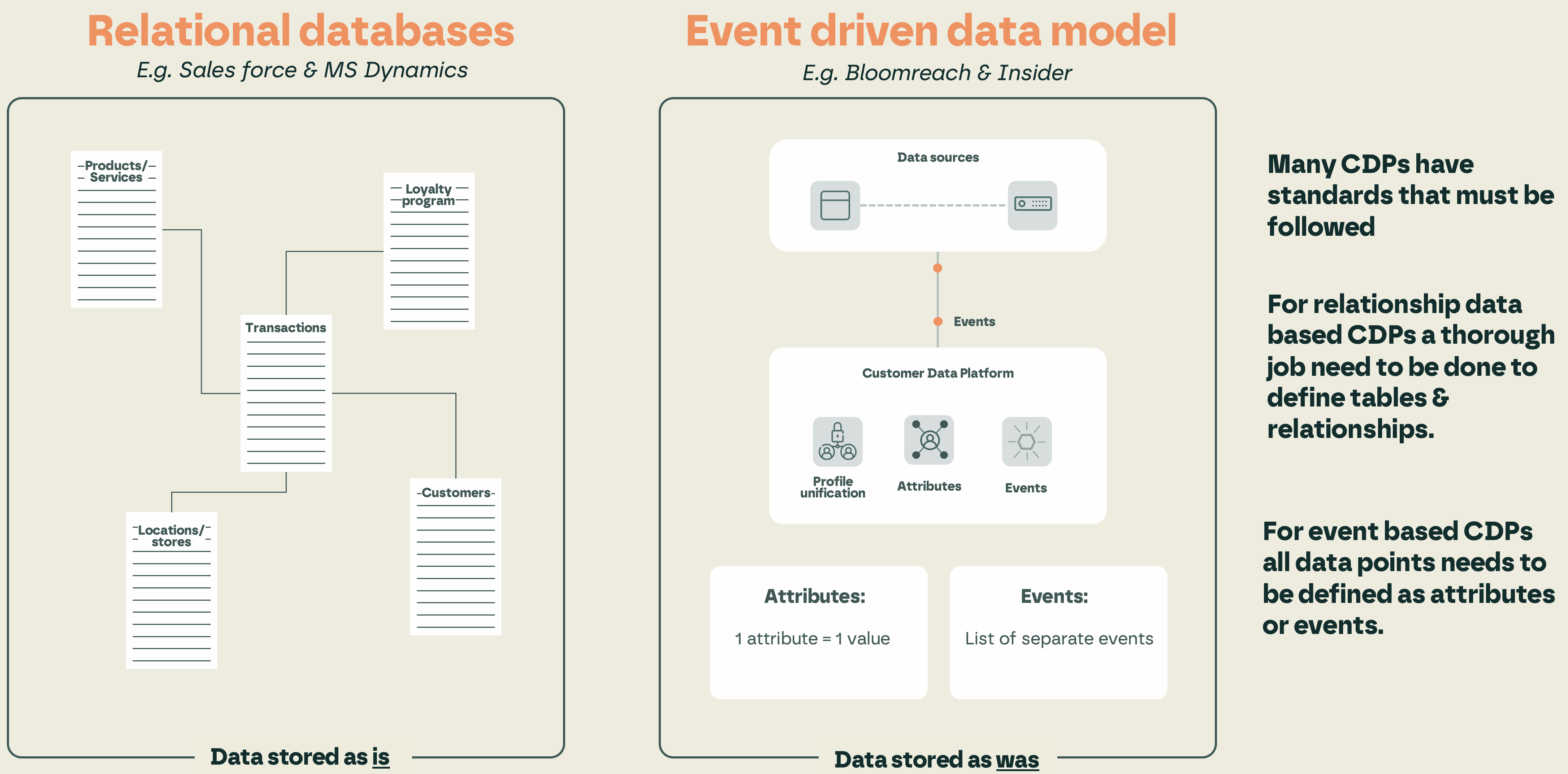
There are two types of data models used by CDPs, and they work very differently.
6. Set up pipelines and integrations
A CDP is only as good as the data flowing into it. This means you need to build solid pipelines from all key systems, both in real time and via batches.
Examples of data sources:
Web and apps (behavioral data, event tracking).
CRM and loyalty programs (customer details, purchases, memberships).
E-commerce and POS (purchase history, shopping behavior).
Customer service tools (support tickets, feedback, NPS).
This is where IT and marketing need to work hand-in-hand. If data is entered in the wrong format or without shared IDs, you'll end up with messy profiles you can't use.
7. Look at your entire IT architecture
One of the biggest mistakes in CDP projects is treating the platform as a standalone solution. In reality, a CDP is just part of a larger ecosystem—and if the bigger picture doesn't work, you risk missing out on its full power, just like in scenario 2 of our article series.
That’s why you should always review your overall IT architecture before starting. The question isn’t just which CDP we should buy, but what role it will play in our total data ecosystem.
Key questions to answer:
Who does what? Should profile merging happen in the CDP or in a Master Data Management (MDM) system? Should data cleaning happen in your data warehouse before it flows into the CDP? Trying to force everything into the CDP can lead to high costs and limited features.
Data governance and quality: Who owns data definitions, quality checks, and duplicate removal? These steps need to be in place before data even reaches the CDP.
Integration with other data platforms: The CDP needs to work smoothly with your data warehouse, data lake, analytics, and BI tools. Having systems complement each other keeps your setup scalable and avoids double work.
Flexibility and future-proofing: Martech moves fast. Build your architecture modularly so you can swap parts out without starting from scratch. Many choose a composable setup where CDP, CRM, loyalty, and analytics act as plug-and-play building blocks.
Speed and real-time needs: Does everything need to happen instantly, or are daily/hourly batches enough for some cases? Answering this early keeps costs down and clarifies your architecture needs.
Security and compliance: Beyond consent, this is about access control, encryption, logging, and keeping tracking clear across all interactions.
Since most CDPs are event-based, your internal systems must also be able to send events correctly.
To put it simply: the CDP is just one piece of the puzzle. Introducing it without looking at your entire IT setup is like replacing a car's engine without checking the gearbox, brakes, and steering.
Our main advice: look beyond the CDP itself. By placing it within a smart, well-structured architecture, you avoid quick fixes and create a setup that is scalable and ready for tomorrow.
8. Configure the platform for your team's needs
Once the CDP is connected, the setup begins—and this is where teams often underestimate the work involved.
Key parts to configure:
User roles and permissions: Who can build segments, set up triggers, or analyze data?
Security levels: Data protection and permission controls must be active from day one.
Channel integrations: The CDP must connect directly to email, SMS, push notifications, web, social, and ad platforms.
A great setup is the difference between a tool that feels fast and helpful, or one that feels clunky and complicated.
9. Activate your data – this is where the magic happens
A CDP is only valuable when you use it to run better communication. This is where you get your return on investment.
Activation ideas:
Trigger-based flows: Welcome series, re-engagement emails, or automated churn prevention.
Personalization: Tailoring email, SMS, push, or web content based on what your customers do and enjoy.
Audiences for social media and Google Ads: Target lookalike audiences or direct ads using your own customer list.
Dynamic real-time content: Changing your website's look or offers based on a user's profile and latest clicks.
If your CDP isn't activating data, it’s basically just an expensive database.
10. Lead new ways of working
Tech is only half the battle. Real success comes from how well your team uses the tool.
This requires:
Cross-team collaboration: Marketing, CRM, IT, e-commerce, and support need to work together on the customer journey.
Clear campaign workflows: Everyone needs to know who does what, from raw idea to launch.
An insights-driven mindset: Use data to understand your customers better, not just to send more messages.
Many brands underestimate the shift in culture. A CDP rollout often means retiring old habits to build better, smarter routines.
11. Start small – then scale up
It's easy for CDP projects to feel overwhelming. Everyone gets excited and wants to fix everything at once. But the most successful projects usually start tiny.
Pick 2 to 3 key use cases that can show value quickly.
Track results closely and show the ROI.
Use those wins to build excitement and momentum.
Once your team sees the CDP drives actual business results, scaling to more channels and use cases becomes easy.
Common pitfalls to avoid
Tech over business: Viewing the CDP purely as an IT project rather than a business tool.
Too much data too fast: Trying to import everything on day one instead of starting with data linked to your first use cases.
No activation: Using the CDP as a storage box instead of using it to talk to customers.
Teams working in silos: Marketing and IT not talking, which dilutes the overall impact.
Final thoughts
A CDP is more than just a piece of software—it’s a transformation. If you get it right, it becomes the brain of your customer relations, gathering and translating data into personal experiences that build loyalty.
Keep the focus on business value, secure a solid data foundation, build cross-team habits, and scale step-by-step. That’s how you turn a technical tool into the motor behind your whole Customer Engagement strategy.