From Data to Action: How to Create a 360-Degree View of Customers
|
Post written by
Photo by: Robynne O

Data is the foundation of everything
Data-driven customer communication doesn't start with channels, campaigns, or algorithms – it starts with data. Without the right data in place, you can't build relevant customer experiences. That's why a Customer 360 – a complete, unified view of the customer – is the very foundation of modern Customer Engagement.
But a Customer 360 isn't just about gathering customer details. To truly personalize, we also need product data, transaction history, behavioral data, and sometimes external sources. For example, if products lack descriptive details (like color, style, or use case), creating relevant recommendations is impossible. If we can't link a purchase to a product's features, we can't predict the next buy or offer the right accessories.
More than just customer data
Many organizations only think of "customer details" when they talk about Customer 360 – like email addresses, phone numbers, consents, loyalty IDs, and behavioral data. But the product data that makes personalization possible is just as important:
Retail: If every product is just a "jacket" in your system, you can't personalize. But if the product has details like color, material, style, and season, you can easily recommend similar items or matching accessories.
Travel: If a booking is just a "trip" in the system, personalization is out of the question. If the trip is broken down into parts (flights, hotels, transfers), you can build messages based on what they need next – like booking a seat, renting a car, or upgrading their room.
Insurance: If a customer simply has "an insurance policy" in your system, personalizing is tough. If you have product details instead (car model, housing type, destination), you can share relevant cross-selling opportunities and tailored offers.
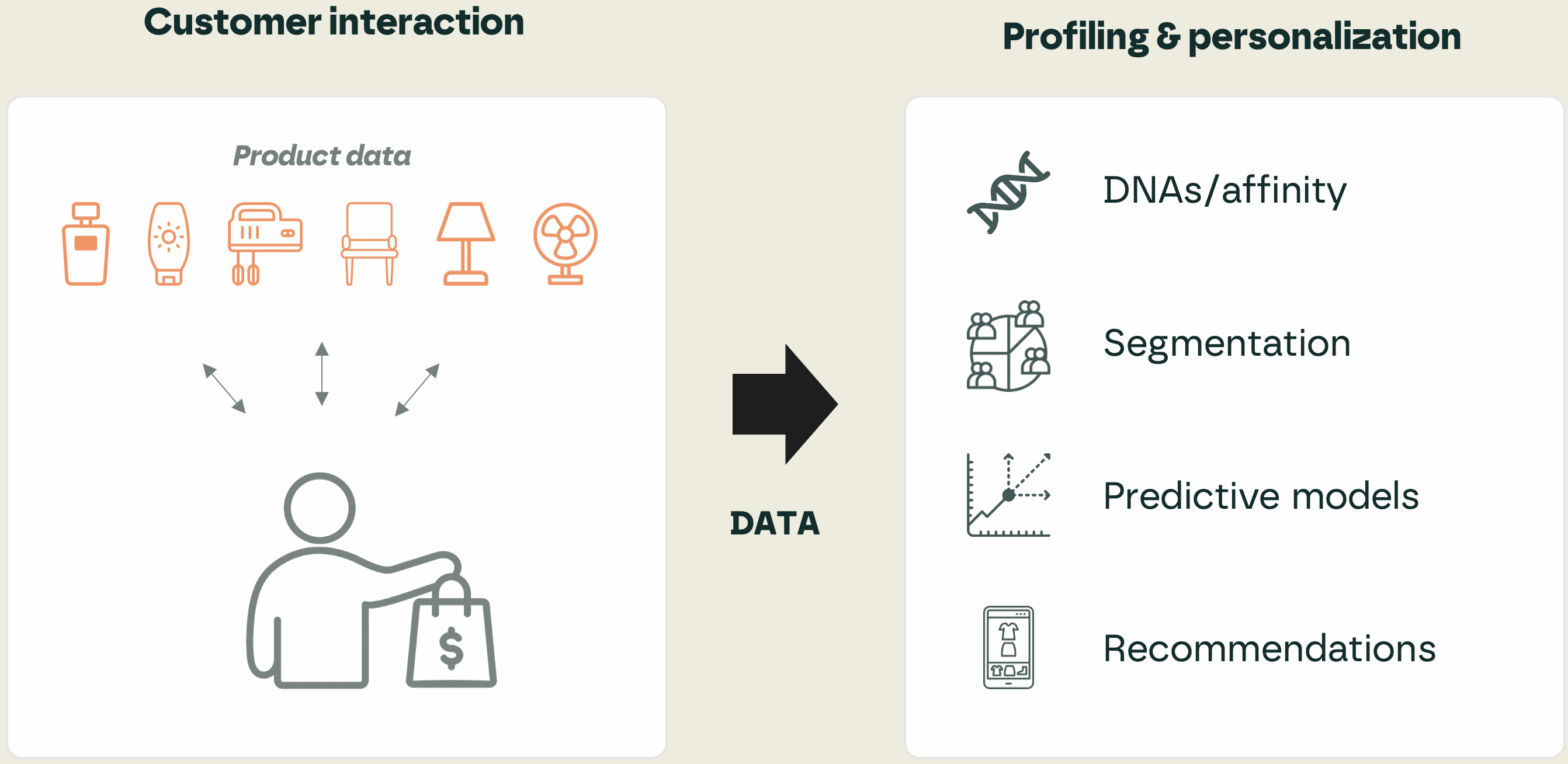
Product data is key to profiling customers and tailoring experiences.
Simply put: Customer 360 = Customer + Product + Context
CDP vs. Data Lake – different roles in Customer 360
When building a Customer 360, companies often wonder: should we gather the data in a CDP or a Data Lake? The answer is almost always "both" – but they serve different roles.
Option 1: CDP as the hub for Customer 360
How it works: All the data needed for a unified customer profile (customer, product, and behavioral data) goes straight into the CDP. This is where identity stitching, profile merging, and activation in channels happen.
When it fits: For organizations looking for quick time-to-value, where marketing and CRM teams need to work directly in the platform without relying on IT or data science. Great for retail, e-commerce, and subscription services.
Strength: Quick setup and a close link between data and action.
Limitation: Can get tricky with massive or highly complex datasets. It can also get pricey since most CDPs charge per event, meaning high volumes drive up costs quickly. To make this work, you often need a specific type of CDP, such as a data integrator. These offer advanced data management features – like data prep, cleansing, and enrichment – to better handle large volumes.
Option 2: Data Lake as the base, CDP for activation
How it works: All raw data (customer, product, transaction, web, sensor data, etc.) is gathered in a central Data Lake. This is where data cleansing, modeling, and AI/ML processing happen. The CDP hooks up as an "end-user platform" for marketing and CRM, feeding on these ready-to-use profiles and product structures.
When it fits: For organizations with complex business models, high data volumes, or many different data sources. Typical for telecom, insurance, travel, and banking.
Strength: Outstanding flexibility, with endless possibilities for advanced analytics and using multiple data sources.
Limitation: Longer time-to-value, and requires strong IT and data expertise.
Option 3: The Hybrid Solution
How it works: Some data is handled directly in the CDP (like web events and campaign responses), while heavy data loads (like transactions and product master data) live in the Data Lake. The CDP and Data Lake sync up to give you a complete Customer 360.
When it fits: For businesses that want to combine quick action with long-term scalability. Perfect for companies that already have a modern data platform but want to give marketing easier access to data.
Strength: Great balance between quick results and scalable growth.
Limitation: Requires clear setups and data governance so things don't get messy.
The Data Model – the foundation of how data is used
Before we look at gathering, unifying, and activating data, we need to focus on a crucial building block: the data model. It decides how data is organized and used, and this choice heavily impacts what you can actually do.
An often overlooked but vital question in Customer Engagement is which data model to use. A data model acts as a framework or blueprint that determines how data is structured, stored, and processed in your system. It also controls how different datatypes relate to each other and shapes how you can use that data in your communication.
In practice, CDPs mainly use two different models – and they work in completely different ways.
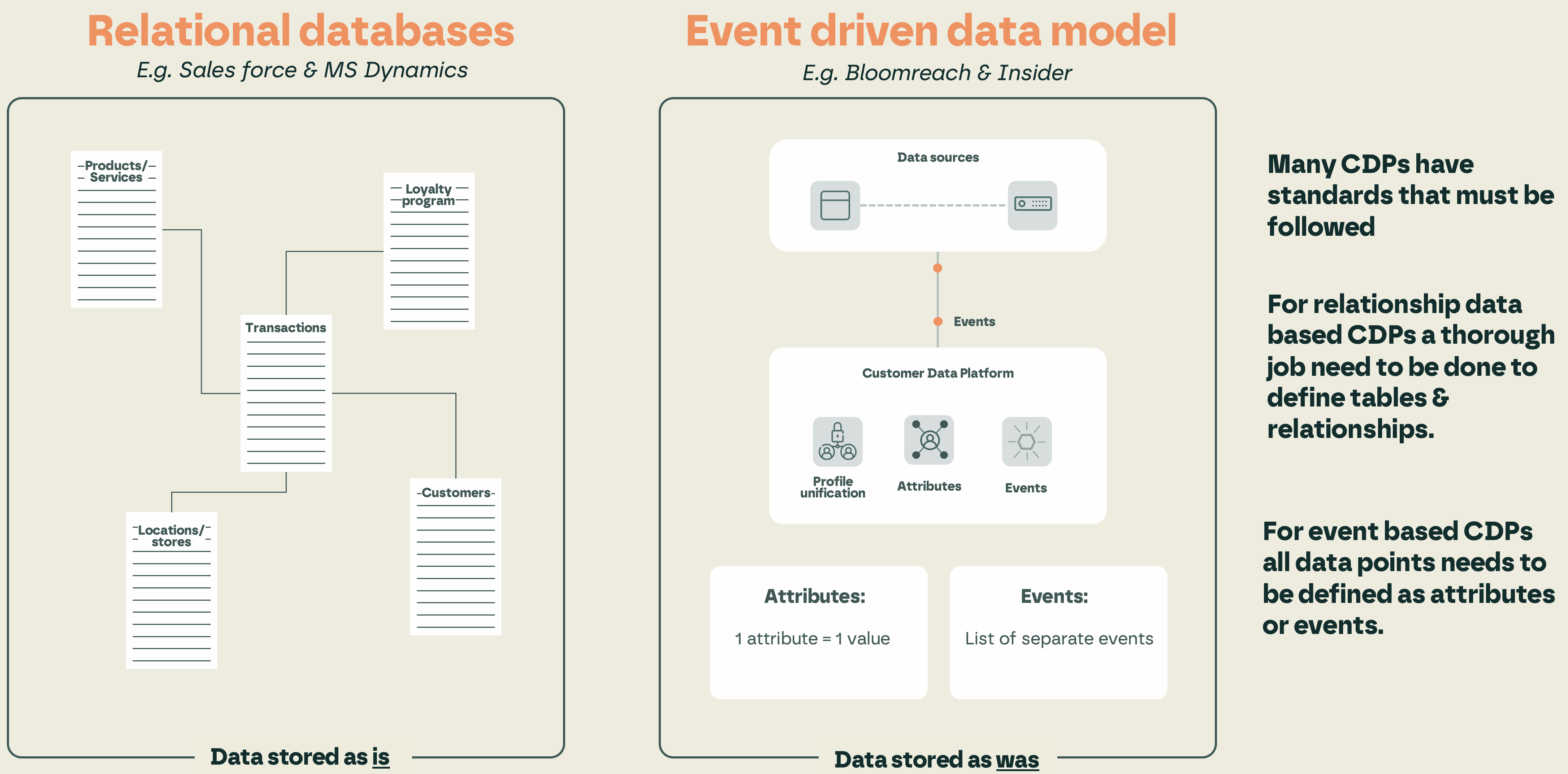
There are two main types of data models used by CDPs, and they work very differently.
The Relational Data Model
In a relational database, information is organized into tables connected by defined relationships. A customer can have several bookings, a booking can contain multiple products, and each product has its own attributes.
Strength: Easily handles complex business logic where many different elements need to be linked together.
Best for: Airlines, hotel chains, telecom, and insurance – where relationships between customers, transactions, products, and services are intricate.
Challenge: Defining tables and relationships requires more upfront work, which often leads to longer setup times.
The Event-Based Model
In an event-based data model, everything is stored as an activity: "customer logged in," "customer bought a product," "customer clicked an email." These events are linked to a customer profile and can instantly trigger personalized messages.
Strength: Highly flexible and fast for building real-time flows and triggers. Perfect for scaling large volumes of data.
Best for: Retail and e-commerce, where transaction volume is high and the customer journey is a series of recurring actions.
Challenge: Every data point must be defined as an event or attribute, which might make it tough to fit complex, multi-layered business relationships.
Which model fits your business?
Relational Data Model: When your business is complex and requires managing multiple connected elements. For example, a hotel where one booking can include multiple rooms, different guests, and various payment methods.
Event-Based Model: When your business relies on high volumes of relatively simple interactions, like in retail where customers quickly buy multiple items.
Simply put: your choice of data model dictates how far you can go with personalization and automation. A model that doesn't match your business logic will ultimately limit both your style and your scale.
How to Collect, Unify, and Activate Data
Building a Customer 360 involves three key steps working in harmony:
Collect data – from all relevant sources: CRM, web, e-commerce, apps, customer service, product databases, and external platforms.
Unify data – merge different identities (loyalty IDs, emails, device IDs, phone numbers) into one single customer profile. You can do this in the CDP, in an MDM (Master Data Management) system, or in a Data Lake. Databases get tricky downstream: the later in the pipeline you try to solve unification, the more complex it gets – and the harder it becomes to use the data effectively in campaigns.
Activate data – put the profiles to work in your channels: email, SMS, push notifications, social media, ads, and on your website. This is where personalization, triggers, and omnichannel orchestration happen.
If one of these steps fails, your Customer 360 will be incomplete (no data collected), fragmented (identities not merged), or useless (cannot be activated).
Common mistakes and how to avoid them
Many companies hit a wall with Customer 360 for similar reasons:
Focusing too narrowly on customer data – while forgetting product details and context. Without these, real personalization is impossible.
Trying to collect "everything" at once – leading to overly complex models that are hard to work with. It is better to start small, focused on data for key use cases.
Choosing the wrong setup – like trying to run everything in a CDP when the business logic actually demands a Data Lake.
Failing to merge profiles correctly – resulting in duplicates and incorrect customer insights.
Collecting data without activating it – where the CDP or data solution becomes just an expensive storage space without driving business value.
By being aware of these traps and taking a structured approach, you can avoid costly errors and see the value of your Customer 360 much faster.
In conclusion
Customer 360 is the starting point for all modern customer communication – but it takes more than just basic customer details. Product data and context must be in place to make personalization real.
The CDP and Data Lake play different roles. The CDP is the tool that empowers marketing and CRM teams to act quickly and personally. The Data Lake is the foundation that manages complexity, massive data volumes, and advanced analytics. Often, the best solution is a combination – where the Data Lake feeds clean data to the CDP, and the CDP makes it ready to activate in real-time.
The key is to always start with your business: what data do we need to create great customer experiences, and which system is best built to handle it?