
Background
With 2.2 billion users worldwide according to the latest Hootsuite report, YouTube is the world's second-largest search engine and second most-visited website. It’s also the runner-up for most popular social channel, right after Facebook. No matter what your goal is, you can use YouTube to show off your product or service through storytelling and drive traffic to your site. Plus, the average adult user spends about 41.9 minutes on the platform every single day.
Paid Marketing
While YouTube's search engine helps people find your organic videos, paid marketing lets you gather valuable audience data. This means you can retarget existing customers and, more importantly, reach new potential leads. You decide your own budget. By targeting people based on age, gender, location, interests, and behavior, you can reach the exact audience that helps you meet your business goals.
Why Advertise on YouTube?
YouTube has a massive audience, and its ad platform makes it easy to boost your reach through video ads. Since users actively search for products and services on YouTube, you can get in front of people who are already interested in what you offer. Dynamic video ads simply grab more attention than static images. In fact, Cisco predicts that 82% of all internet content will be video.
What You Need to Get Started
To start advertising, you’ll need a Google Ads account and a YouTube channel where you can upload your videos.
Next, you'll write the text that explains who you are and what you offer. Choose an eye-catching headline to hook your audience, followed by a short description. You'll also need a thumbnail image to act as the cover photo for your video before people click on it. Finally, choose where people should land when they click and what action you want them to take (your "call to action").
You can also pick keywords where you want your ad to show up, and select a campaign goal—like boosting brand awareness, driving traffic, or influencing buying decisions. Then set your budget, either per day or as a total amount for the entire campaign. Pick where you want your ads to appear, and you're good to go.
We’ll dive deeper into these steps further down in this post.

Drafting Your Strategy
To build a solid campaign, you first need a clear goal. You can choose from these six options:
New viewers
More subscribers
Broader global reach
Promoting a product or service launch
Conversions
Reaching new audiences / Cross-selling
Your Audience: Take a look at who you want to reach. Ask yourself the basics: Who, what, where, and when? This helps you narrow down and target the right group.
Your Content: Once you know who you are targeting, consider where they are in the buyer's journey to reach them effectively. In a classic marketing funnel, the first phase is about grabbing attention. The next phase gets interested users to learn more, and the final phase gets them to take action and convert. Getting the message right is key. Since 70% of YouTube videos are watched on mobile phones, always think "mobile first" in your strategy.
Timeline: Keep holidays in mind when planning your campaign. Competition is usually higher during these times, which means ads can cost more.
Budget: What you pay depends on two things: your bidding strategy and your payment model.
Max CPV: The most you are willing to pay per view.
Max CPM: The most you want to pay per 1,000 views.
Viewable CPM: The most you want to pay per 1,000 viewable impressions.
Target CPM: The average amount you choose to pay for every 1,000 views.
Target CPA: Google Ads automatically sets bids to get you as many conversions as possible within your target cost.
CPD: Available for masthead ads, this is a flat cost per day.
Step-by-Step Guide to YouTube Ads
Step 1: Choose Your Campaign Goal
Leads – Build interest and get potential customers to interact with your brand.
Sales – Boost online, app, phone, or in-store sales by getting users to buy or share their info.
Website Traffic – Get the right people to visit your site.
Product and Brand Consideration – Encourage people to explore your products or services.
Brand Awareness & Reach – Reach a broad audience and put your brand on the map.
Step 2: Set Your Budget
Your bidding strategy is optimized based on your goal. If you want views, you'll use CPV. If you want exposure, you'll use CPM. You can set a Campaign Total Budget (where Google distributes your budget across the campaign) or a Daily Budget (the maximum you want to spend per day).
Step 3: Define Your Audience
Once you understand your audience's habits and interests, you can build your target groups in Google Ads. You can choose from these options:
Affinity Audiences - Reach people based on their lifestyle, habits, and interests.
Life Events - Reach people going through major milestones, like graduating college.
In-Market Audiences - Reach users actively researching and considering products like yours.
Custom Audiences - Reach users based on what they recently searched for.
Custom Intent Audiences - Reach users based on their recent purchase intent.
Remarketing - Connect with people who have already interacted with your business.
Detailed Demographics - Reach users based on shared, long-term traits.
Customer Match - Reach current customers using your own CRM list.
Similar Audiences - Reach new people who share interests with your existing customers.
Step 4: Pick Your Ad Format
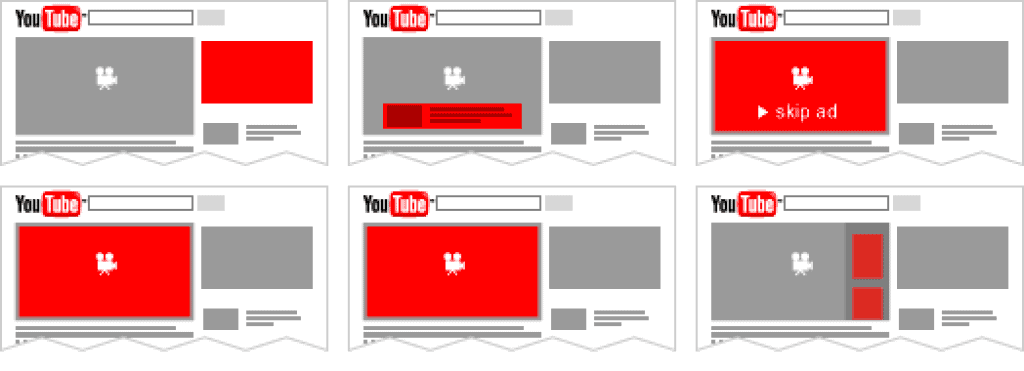
With your goal and audience locked in, it's time to choose where your video will show up. While the standard video format is 16:9, YouTube offers several unique placements:
In-Stream Ads – These play before, during, or after other videos. They can be skippable (users can skip after 5 seconds) or non-skippable.
Video Discovery Ads – These look like a thumbnail and a bit of text, inviting users to click and watch. They appear on search results, next to related videos, or on the YouTube mobile homepage.
Bumper Ads – These are quick, non-skippable ads of 6 seconds or less that play before, during, or after another video.
Outstream Ads – These mobile-only ads start playing with the sound off, and users tap to turn it on. Great for boosting reach at an affordable price.
Masthead Ads – This format autoplay without sound at the top of the YouTube homepage on computers, mobile devices, and TVs.
Step 5: Measure Your Success
Depending on your campaign goal, you should track specific KPIs. For example, if you want Brand Awareness, focus on impressions and views. If you want sales, focus on Conversion Rate.
Here are some key metrics to watch on YouTube:
Views – How many people watched or interacted with your ad.
Completion Rate – The percentage of people who watched your video to the end.
Watch Time – The total time people spent watching your ad.
CTR (Click-Through Rate) – Clicks divided by the number of times your ad was shown.
Reach – The total number of unique users who saw your ad.
Conversion Rate – How many people completed your desired action.
A/B Testing: To see what works best, try running two similar ads with small tweaks—like a different headline, color, or call to action. Compare the results to keep improving your ads.
Summary
Since Google owns YouTube, advertising here also boosts your visibility on Google search results. It’s a great way to show up in related searches across both platforms.
Video is the absolute king of engagement on social media, with mobile video leading the way. In today’s competitive market, standing out with creative storytelling tailored for mobile is the best way to build trust and drive conversions.
The social media landscape changes fast, so always keep testing new ideas. What works today might change tomorrow!
Thanks for reading! Don't forget to subscribe to our newsletter for more tips!