LinkedIn is a unique social platform founded back in 2002. Today, it has over 260 million monthly active users, and a total of 760 million users across more than 200 countries according to data from Kinsa. The platform offers massive opportunities for anyone looking to build a professional network and do B2B outreach. On average, LinkedIn users spend 17 minutes a day on the site. Out of all active users, 40 million search for jobs here every single month.
The evolution of paid marketing.
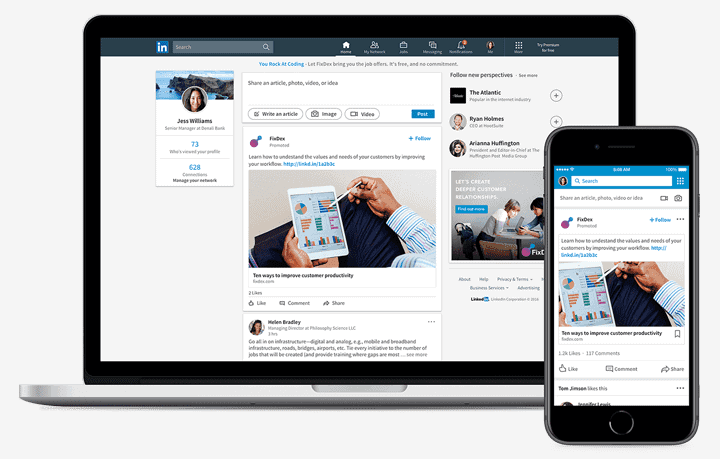
We’ve been able to use paid ads on LinkedIn for ten years now. Advertising is a cost-effective way to reach beyond your current followers and find new potential customers. Advertising on social channels has opened up great business opportunities, boosted e-commerce growth, and created brand new ways for companies to recruit and find top talent.
Opportunities with LinkedIn advertising.
As an employer, you can target the specific roles you want to hire through recruitment ads. The beauty of LinkedIn is that you can find the right skills within your network and fill positions without candidates even actively looking for a job. But you can also set up ads to generate leads, win new customers, boost your brand awareness, or get people to sign up for your webinar.
How to get started - Advertising on LinkedIn.
To advertise on LinkedIn, you first need a personal profile to create an ad account in Campaign Manager, which is LinkedIn's ad platform. You also need a company page to get up and running.
LinkedIn Insight Tag.
To measure your results and analyze your audience, we highly recommend setting up your tech integration before your campaign goes live. Just like the Facebook pixel, you can install a LinkedIn Insight Tag to keep track of your audience.
Strategy - LinkedIn Advertising
This is a basic strategy for your advertising on the platform. Further down, we’ll take you step-by-step through what you need to keep in mind when getting started.
Goals
You need a clear goal for your campaign, based on where your audience is in their customer journey. You can choose from these goals:
Brand awareness
Consideration
Conversion
Audience.
LinkedIn's ad platform stands out because you can target highly specific job roles using actual employee and company data. Choosing the right audience is the absolute key to success – if you aren’t reaching the right people, your campaign won't be profitable.
Formats.
There are seven different image and video ad formats to choose from on LinkedIn. Pick the format that best fits the content you want to share and see where it fits best. We will cover formats and placements in more detail further down.
Budget.
LinkedIn ads are sold through an auction, meaning you bid against other advertisers who want to reach the same audience. You can choose your pricing model via CPC (cost per click) or CPM (cost per thousand impressions).
Step-by-step guide - LinkedIn Advertising.
You can create your first ads inside Campaign Manager. Here is how you do it, step-by-step:
STEP 1 – CHOOSE A CAMPAIGN GOAL
Brand awareness: Choose this to reach a broad audience of new potential customers who might not know your brand very well yet.
Consideration: Choose website visits, engagement, or video views to connect with people who have already interacted with your brand in some way.
Conversion: Choose lead generation, website conversions, or job applicants to get your audience to take action – like applying for a job in a recruitment ad or filling out a form about your product or service.
STEP 2 – DEFINE YOUR AUDIENCES
As we mentioned earlier, this is the most critical step of all. You can build your target audiences based on:
Company
Demographics
Education
Work experience
Interests and qualifications
If you’re not sure how to build your audience, you can start with LinkedIn’s templates and customize them. LinkedIn will offer suggestions, and you can choose whether the audience should have connections within fields like "finance". You can also exclude people you don't want to target, such as your current employees.
STEP 3 - FORMATS AND PLACEMENTS
Pick a format that aligns with your goal. Here are the formats you can use:
Sponsored Content - Boost posts you’ve already shared on your company page. You can sponsor photos, videos, and links. When these pop up in your audience's feed, you can use a lead gen form as a call-to-action to capture high-quality leads.
Single Image Ads – A simple, static image.
Video Ads – A video that plays automatically in your audience's feed as they scroll.
Lead Gen Ads – These let you attach a form to your ad, making it easy for users to download something like a report.
Carousel Ads – Show multiple images in a swipeable gallery format. You can also add a lead gen form to these.
Dynamic Ads – These let you personalize ads for specific goals, like getting page followers, promoting job openings, or showing spotlight ads.
Text Ads – These appear in the right-hand column of the desktop feed. They are great for driving traffic to your website if you use a catchy headline and image.
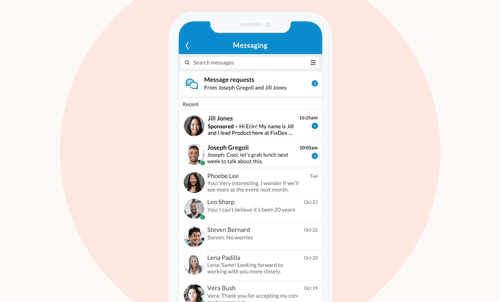
Message Ads – These deliver ads directly to users' inboxes. They feel more personal than other formats, giving you a direct line to the people you want to reach.
STEP 4 - BUDGET
Advertising on LinkedIn is more expensive than on other platforms because you are competing with other brands to reach the same high-value audience. To keep your ads cost-effective, we recommend using LinkedIn's automated bidding. It adjusts your bids to get you the best results without going over your set budget limit.
There are two main ways to control your spend:
Daily Budget - Decide the maximum amount you want to spend per day.
Bidding options:
Maximum cost bid – The absolute most you are willing to pay per click (CPC), impression (CPM), or send (CPS).
Automated bidding – LinkedIn uses its data to automatically set and adjust your bids to get you the most results for your chosen goal.
STEP 5 - MEASURE YOUR RESULTS
Just like with Facebook ads, you can track several key metrics on LinkedIn:
Reach – How many people have seen your ads?
Click-through rate (CTR) – What percentage of people are clicking on your ad?
Cost per click (CPC) – How much does each click cost you?
Frequency – How many times a week does your audience see your ad on average?
Video completion rate – How long are people watching your video ads?
Traffic – How many visitors is your ad bringing to your website?
ROAS - What is your return on ad spend?
Conversions – How many people completed the action you wanted them to?
Cost per action (CPA) – What is the actual cost per lead?
These metrics help you see if your campaign is hitting its goals so you can tweak and optimize your ads while they are running.
A/B Testing: Just like on Facebook, you can run A/B tests to see what your audience likes best. Simply create two similar ads and change one small detail, like the color, copy, or language. Then, see which one performs better and use those insights to improve future ads.
To sum up.
Like any social media advertising, seeing real results takes time. As an advertiser on LinkedIn, keep in mind that while it is easy to get hyper-focused on targeting super-specific job titles, you should keep your targeting broad enough to maintain a healthy reach.
Make sure you allocate a realistic budget. It costs more to advertise on LinkedIn than on Facebook because of the high competition for the same audiences. Investing a bit more in your bids can help you win the auction against competitors. Remember, you can always adjust your budget while the campaign is running – so keep optimizing!
In advertising, testing is everything. There are guidelines, but no single formula for reaching your audience. So jump in, learn by doing, and OPTIMIZE as often as you can!
Hope you found this helpful! Don't forget to stay updated by subscribing to our newsletter.